Call testing

Get paid for incoming calls

Phone companies need to check that their calls connect. Money SMS sends these quick test calls to your phone, and every single one earns you money.

€0.02 Per call
Silent No ringing
Free No cost
Automatic No effort
Test call received
+€0.02 earned
Call earnings
Credited instantly
9:41
5.78 €
You're online

Stay online to keep receiving test calls.

Your availability
96%
The higher the percentage, the more test calls you receive
Call Testing
58Last 30 days
236Total calls
€4.72Total earned
Current rate: €0.02/call

Please note that the withdrawal process might take up to 48 hours.

Why you might not see it

Call testing only appears when your network needs testers, and phones are chosen automatically. If you don't see it yet, your network has enough for now — you can't request it. Just stay online, and it can appear later.

What happens during a test call

Once it's switched on, every test call runs the same four-step round trip — start to finish in about a second, with nothing for you to do.

1

A carrier needs to test

Telecom partners constantly check whether their calls actually connect on real networks like yours.

Real carriers, worldwide
2

A test call reaches you

The testing network places a call to your phone through Money SMS — not a real person, just a routing check.

Incoming test call
3

The app declines it instantly

Money SMS spots the test call by its caller ID, ends it before it rings, then reports whether it arrived and showed the right number.

Under 1 second
4

You're credited

The result lands with the carrier and the reward lands in your balance — automatically, the moment it completes.

+ €0.02 per call

How to make money from incoming calls

Follow these six steps to turn it on — but remember, it only appears when your network needs testers, so you may not see it in the app yet.

Money SMS settings screen showing call testing option
Step 1

Check availability

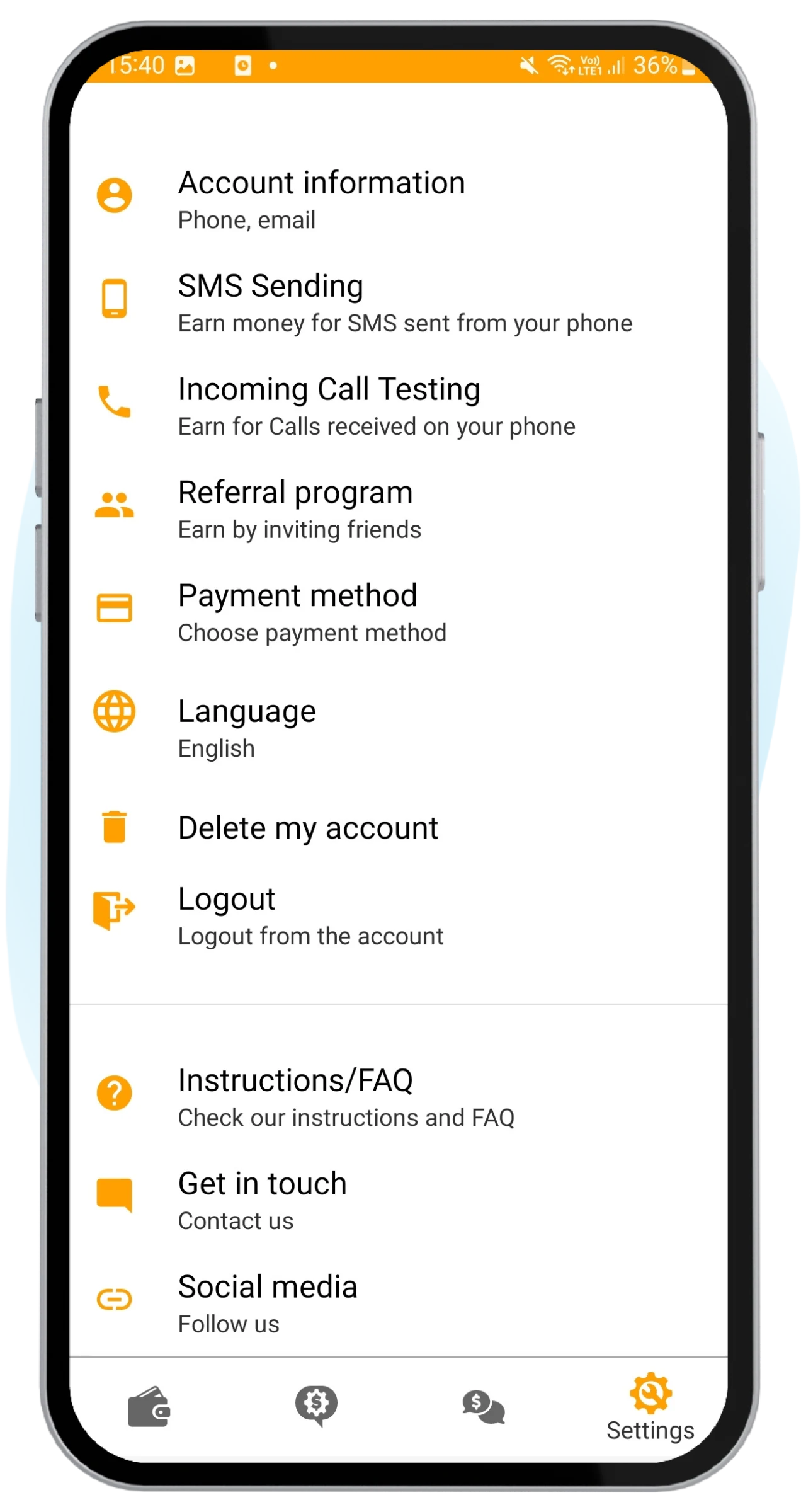
Incoming Call Testing is off by default. It turns on automatically when there's testing demand in your network and your account fits the criteria.

When it's active, you'll find it in the Settings tab and on the launch screen. If it's not there yet, your network just has enough testers for now.
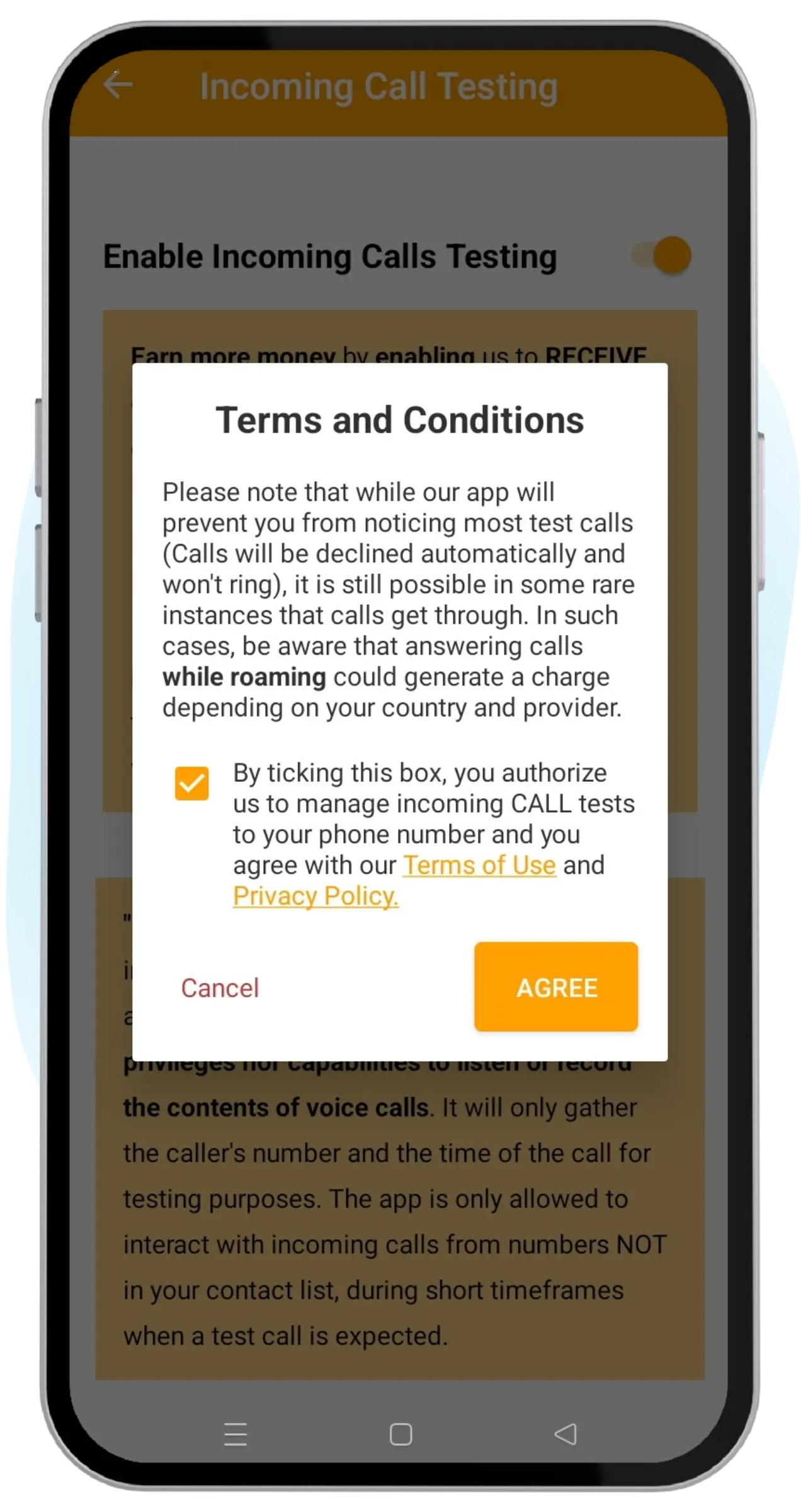
Enable Incoming Call Testing toggle screen
Step 2

Enable call testing

If the feature is available to you, open it and turn on the "Enable Incoming Call Testing" option. Review the Privacy Policy and accept the Terms & Conditions to continue.

Once you accept, Call Testing switches on right away — there's nothing else to install.

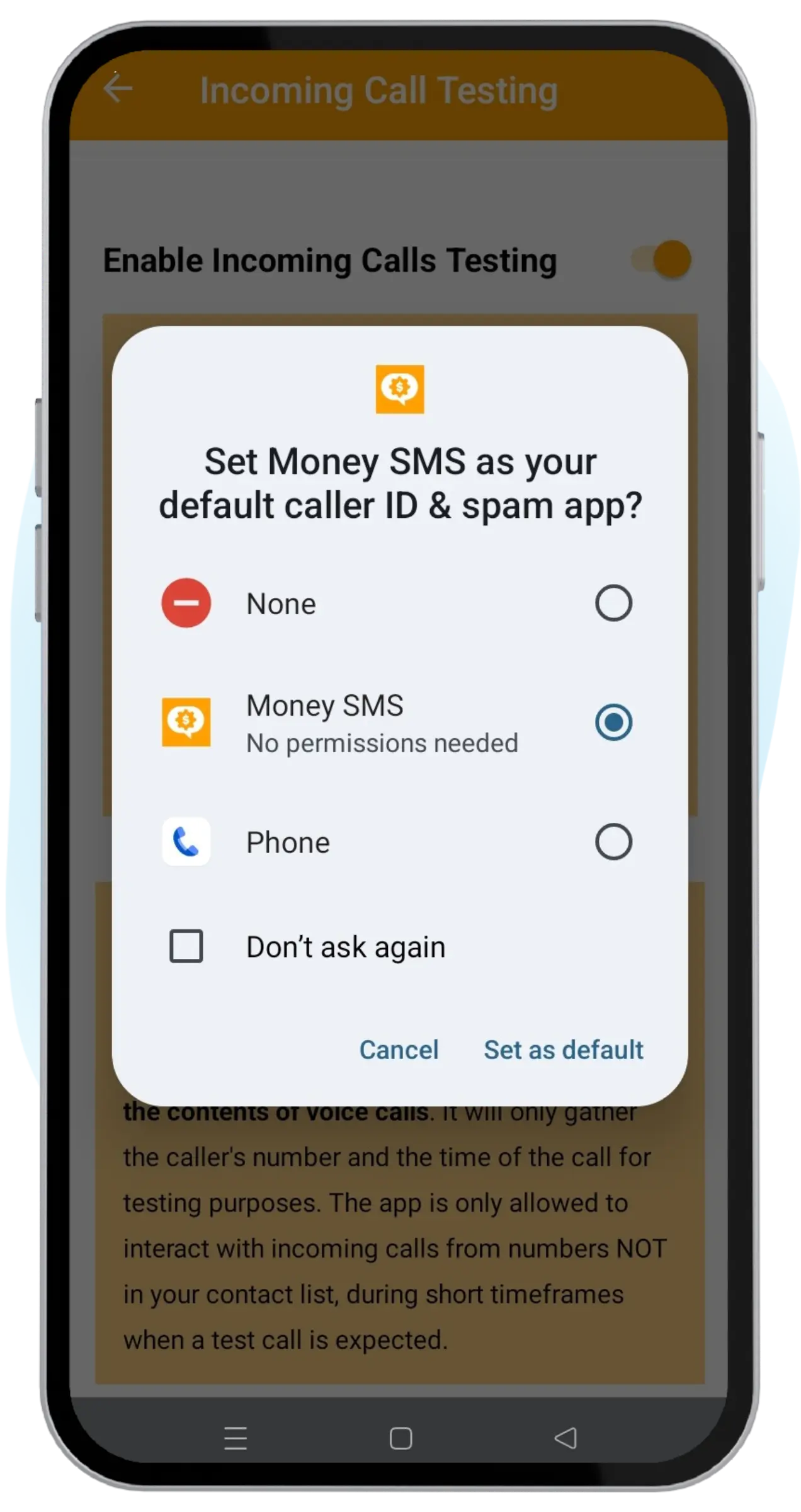
Set Money SMS as default caller ID and spam app
Step 3

Set caller ID & spam app

If the toggle stays inactive, set Money SMS as the default caller ID & spam app in your settings. Many phones ask you to do this while you turn on Call Testing.

This lets the app recognize incoming test calls and decline them automatically. It does not give the app access to your personal calls.

Call testing enabled on the launch screen
Step 4

Make sure it's working

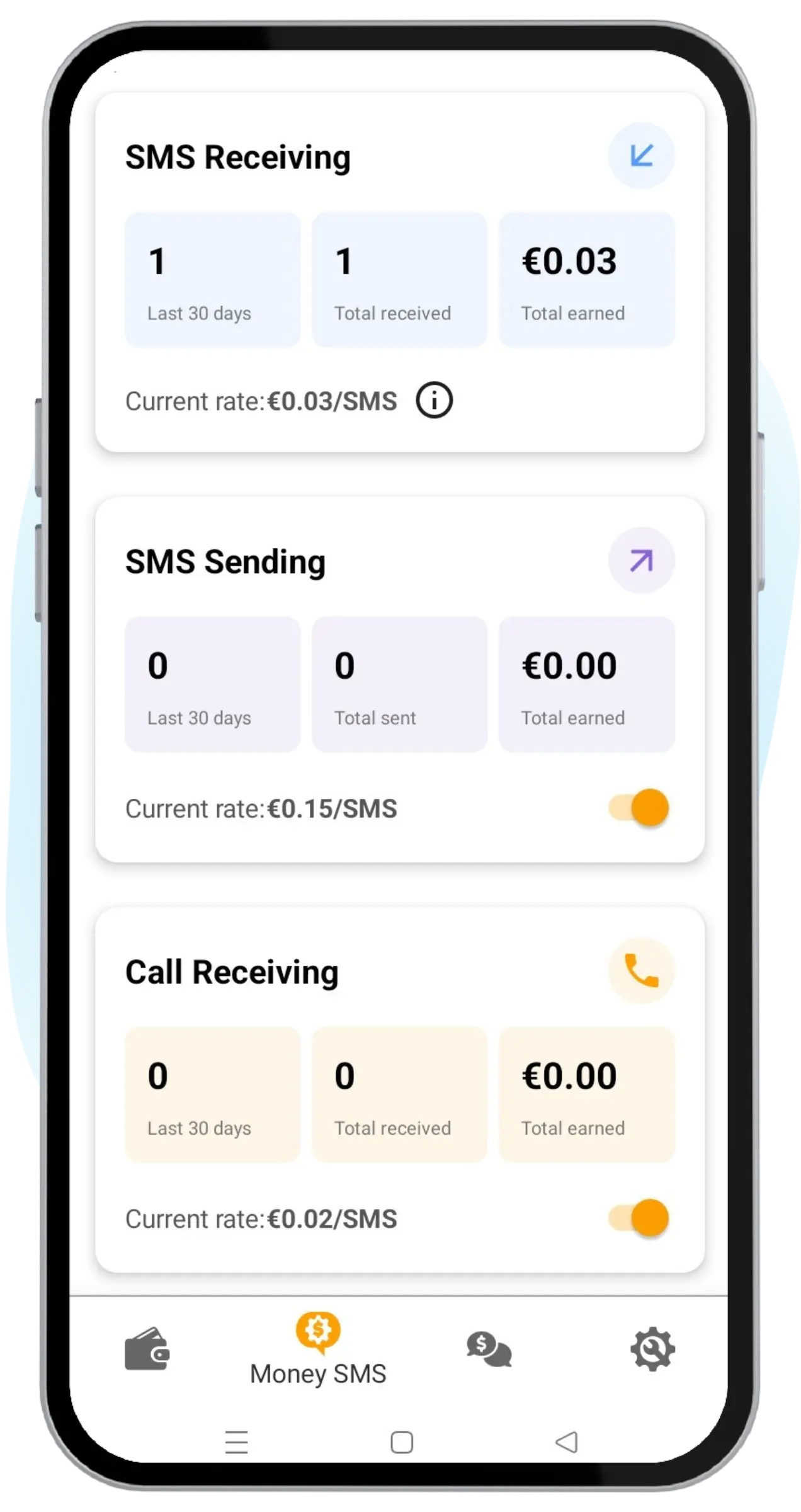
Once Call Testing is switched on, the Call Testing section appears on the launch screen. This confirms the feature is active and ready.

Here you can check your current rate, the number of test calls from the last 30 days and in total, and how much you've earned so far.

First test call received in the app
Step 5

Receive your first test call

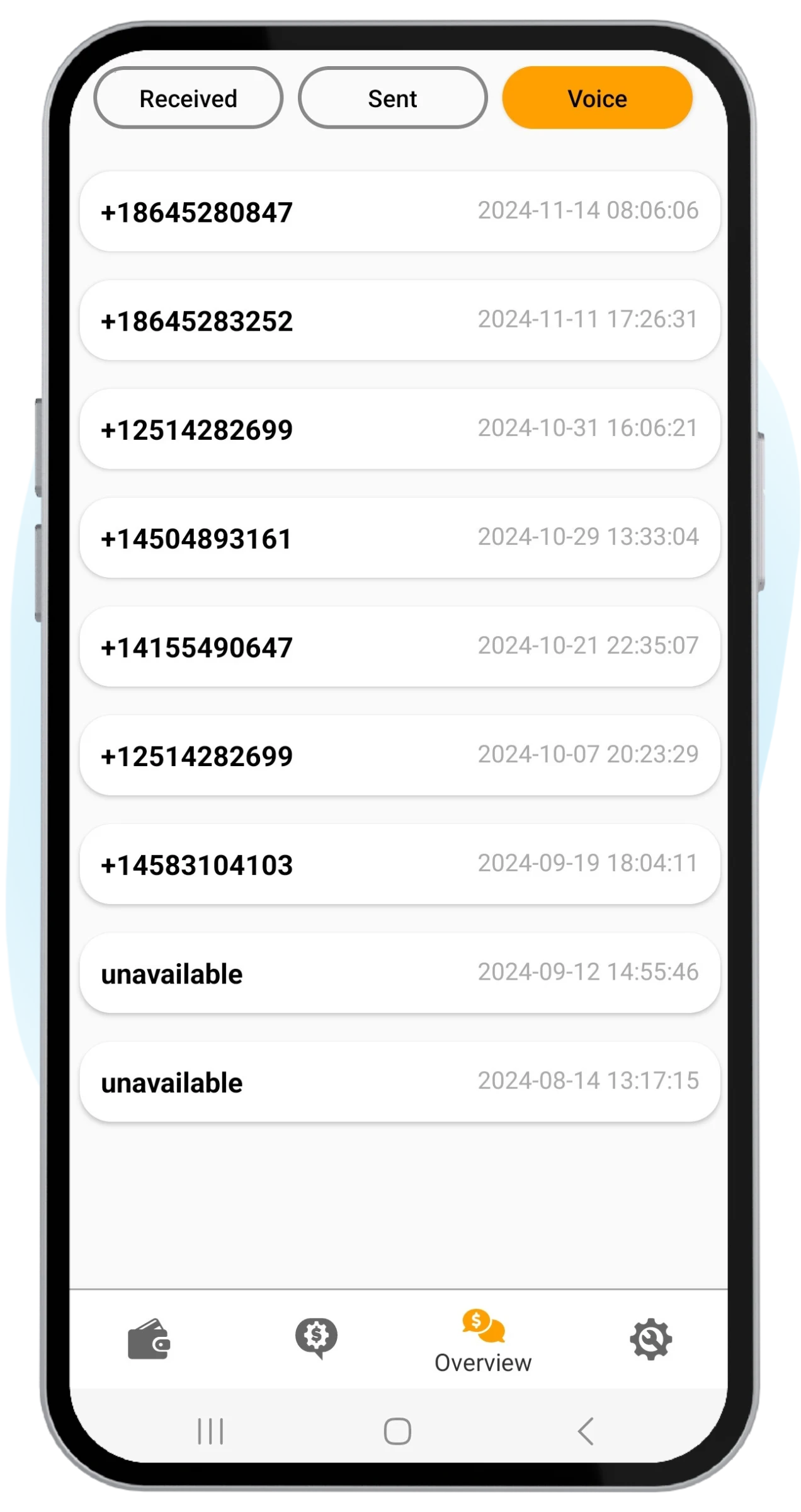
After the previous steps are done, we make a test call to confirm everything works as it should. The call is silent and declined automatically.

To keep receiving test calls, check your internet connection and stay online as much as you can. The more available you are, the more calls you get.

Balance screen showing call testing earnings
Step 6

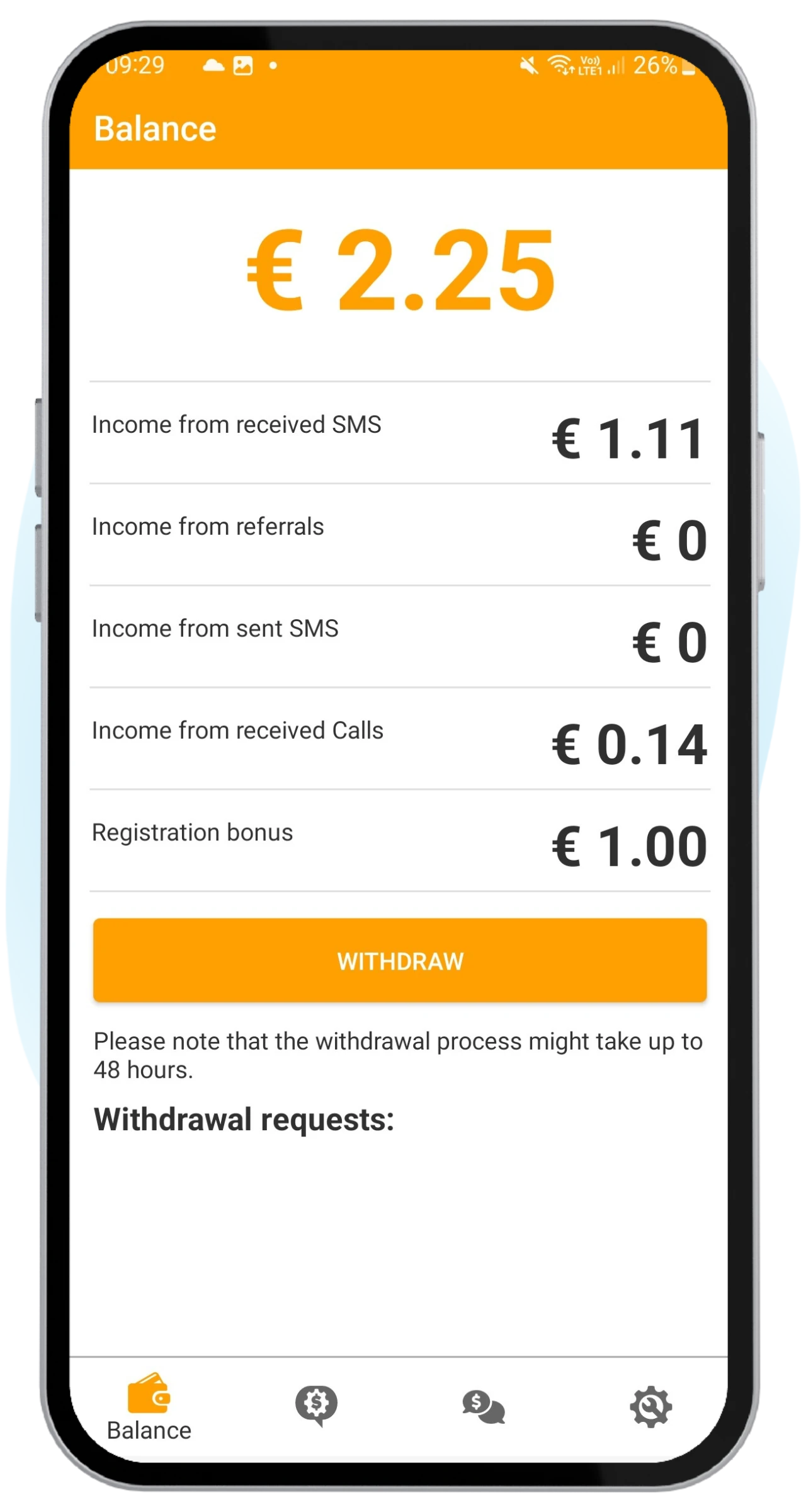
Get paid to receive calls

You earn €0.02 for every test call, starting from the very first one. There's no upper limit on how many test calls and payments you can receive.

Stay online and watch your balance grow. Once you reach the €2 minimum, you can withdraw to PayPal, Bitcoin, or Litecoin.

Stuck on a step?

Every phone brand words these screens a little differently.

Your calls and contacts stay private

To auto-decline test calls, Android asks you to set Money SMS as your caller ID & spam app. Here's exactly what that permission can and can't do.

Caller ID & spam Optional, scoped

Will it control my normal phone calls?

No — it only lets the app hang up silent test calls.

Android only lets your default caller ID & spam app end an incoming call on its own. Money SMS uses that one ability to decline test calls before they ring — your normal calls, dialer, and contacts are untouched.

What call access does

  • Silently declines test calls from the testing network, quietly in the background while you carry on as normal.
  • Checks the test call's caller ID only to confirm it connected and arrived correctly — never any audio.
  • Stays the caller ID handler only so Android allows auto-decline — and you can switch it off at any time.

What it never does

  • Listens to, records, or transcribes any of your calls — test or personal. The app has no access to call audio at all.
  • Touches, blocks, or screens your real calls, contacts, or messages — everyday phone use stays the same.
  • Keeps anything from a call that fails the test number check — it's dropped instantly, never stored or sent.

Earn money from phone calls

Cash out your call testing earnings through three simple payout options. Pick the one that works best for you and enjoy hassle-free withdrawals.

PayPal

PayPal

+ Most popular

Direct transfer to your PayPal account.

Speed Same-day
Fees None
Bitcoin

Bitcoin BTC

Paid to your Bitcoin wallet on-chain.

Speed ~30 min
Fees €0.10
Litecoin

Litecoin LTC

+ Fastest

Faster on-chain settlement than Bitcoin.

Speed ~5 min
Fees None

Speeds shown are after Money SMS processing, which takes 24–48 hours.

More ways to earn with Money SMS

Stack extra income on top of call testing — same app, zero extra effort.

Referral program

Your friends earn — and so do you, every time. Invite them to Money SMS with your code: you get a cut of everything they withdraw, and they get a head start for joining.

Learn more
30% of every friend's withdrawals — you earn it every time they cash out, ongoing and never a one-off.
€0.50 welcome bonus per friend — €0.25 for registering, plus €0.25 for using your referral code.
Operated by TelQ Telecom GmbH German telecom · since 2016
Paid out to users €1M+ & counting PayPal · Bitcoin · Litecoin
Rated by users 4.5 ★ Trustpilot Real reviews from real users
Data residency EU only · GDPR Personal messages never stored

Frequently asked questions

Common questions about the incoming call earn money app.

It varies by network. Once Call Testing is switched on, we send a test call to confirm everything works — sometimes within minutes. After that, calls come whenever your network needs testing, so there's no fixed schedule. The longer you stay online, the more chances you have to receive them.

No. All test calls are automatically declined before they connect, so no airtime or call charges ever apply — even on a pay-as-you-go plan. There's no subscription, no setup fee, and nothing to buy. You only earn money — you never spend it. The feature is completely free to use.

No. Test calls are short and declined automatically, so they barely touch your battery. The app only uses a little data to stay connected and coordinate with the testing network — far less than streaming music or browsing.

Yes! Call testing runs alongside SMS receiving and sending. All three features work independently in the background, maximizing your earnings without any extra effort on your part.

Get paid for phone calls

Download Money SMS and let your phone earn even more with silent test calls — completely automatic, completely free.

Withdraw via